Photo of Marco
Marco
  • Tue Jun 16 2026

Live-streaming CommCon 2026 with MOQ: a guide and a cautionary tale

Live-streaming CommCon 2026 with MOQ: a guide and a cautionary tale

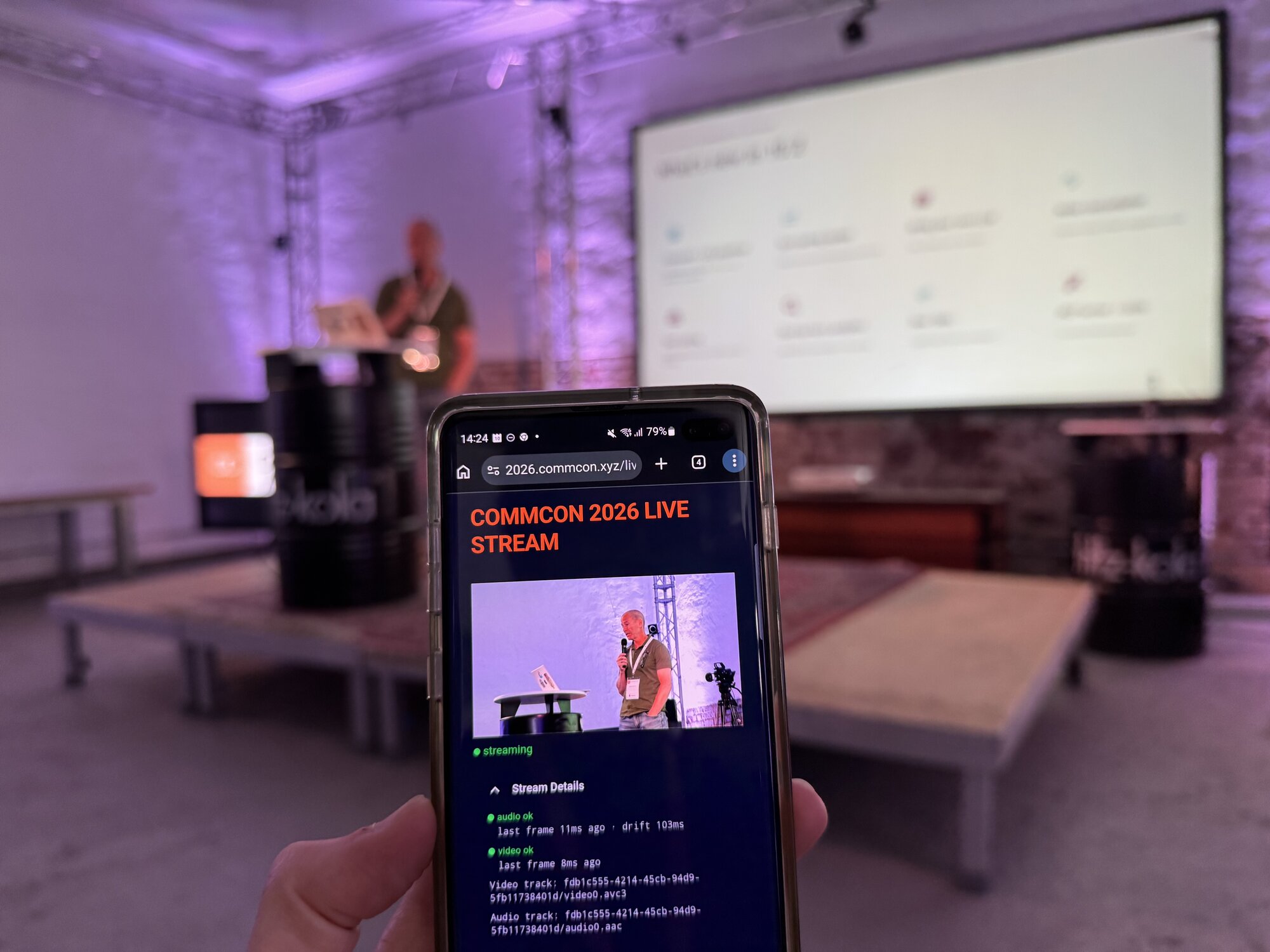
Last week, CommCon 2026 in Düsseldorf became one of the first conferences in the real-time communications space to be live-streamed using MOQ. In the weeks leading up to it, I built the streaming setup from scratch: reading IETF drafts, getting an OBS plugin to publish over MOQ, and writing a custom browser player to receive and play back the stream.

This post describes how I did it, the problems I ran into along the way, and what I'd do differently. It's aimed at developers who want to use MOQ today, using the available tools and projects where possible. MOQ tooling is still young and moving fast, so some of this will date quickly, but the decisions and trade-offs are likely to stay relevant for a while.

Why MOQ?

I first got excited about MOQ after watching Ali C. Begen's talk "Streaming Bad: Breaking Latency with MOQ" at RTC.On 2025, followed by Luke Curley's "MoQ: Not Another Tech Demo" at Demuxed 2025. The promise is genuinely compelling:

  • Sub-second latency at CDN scale
  • On-demand replay using the same relay infrastructure as the live stream
  • Seamless rewind: fetch older objects from the relay, then jump back to the live edge in the same player
  • Natural insertion points for AI processing mid-stream, since you're handling individual media objects

On the other hand, the IETF draft is still in flux, and there are only a handful of open-source projects at various stages of maturity. To our knowledge, nobody had live-streamed a conference in the real-time communications space using MOQ before, so we decided we’d give it a try at CommCon 2026.

The stack

Before writing a single line of code, you need to make three decisions: what will publish the stream, what will relay it, and what will play it back. These three components need to agree on a MOQ draft version, and that choice will constrain everything downstream.

Publisher: OBS + moq-obs plugin

Since we planned on receiving an NDI feed from the venue’s AV setup, publishing from OBS was the obvious choice here. I used the moq-obs plugin, which required building both the OBS fork and the plugin from source. The plugin publishes separate video and audio tracks over MOQ.

Constraints to be aware of:

  • 720p cap: the plugin doesn't support higher resolutions at the time of writing
  • H.264 Annex B video. This turns out to matter a lot (more on this below)
  • Raw AAC-LC audio: one frame per MOQ object, no init object
  • The plugin targets MOQ draft 15+, which creates friction if your relay is on an older draft
  • Catalog format changes: upgrading libmoq from 0.2.9 to 0.2.13 changed both the catalog format and broke compatibility with older relays. I ended up pinning to an earlier commit.

Relay: Cloudflare

Cloudflare operates MOQ relay infrastructure across its network: every Cloudflare server is potentially a MOQ relay. The appeal is obvious: you get a global CDN without deploying or maintaining anything yourself.

The relay is currently an alpha release and it comes with trade-offs: Cloudflare's relay is on MOQ draft 14, and not all message types are supported. This fact cascades through your entire stack. It means:

  • Your publisher and subscriber must be compatible with draft 14
  • Although described in draft 14, the FETCH message type is not currently supported by Cloudflare, which eliminates any VOD or rewind capability
  • Similarly, the SUBSCRIBE_NAMESPACE message type is not supported, which means you need to rely on the catalog for track discovery
  • You have no visibility into what's happening on the relay side, which makes debugging publisher/relay interactions very difficult

If I did this again, I'd be tempted to deploy my own relay, for example using the MOQtail relay. You lose the global network, but you gain full control over the draft version, supported features, and the ability to actually debug what's happening between the publisher and the relay. The Cloudflare black box caused me a lot of confusion over audio issues that may or may not have been draft incompatibilities.

However, deploying one or two instances of a relay is not the same as having a CDN. Tech demos are easy if you control all the parts, but our purpose for CommCon was really to show what's currently possible with the tools available out there. Not using the Cloudflare CDN would mean giving up on one of the main selling points of MOQ.

Player: MOQtail + custom code

I used MOQtail as the MOQ client library, which handles the WebTransport connection and the MOQ protocol message exchange with the relay (subscribe, unsubscribe, object delivery). The media handling (building video frames, decoding audio, syncing playback) is all custom code, and that's where the real work was.
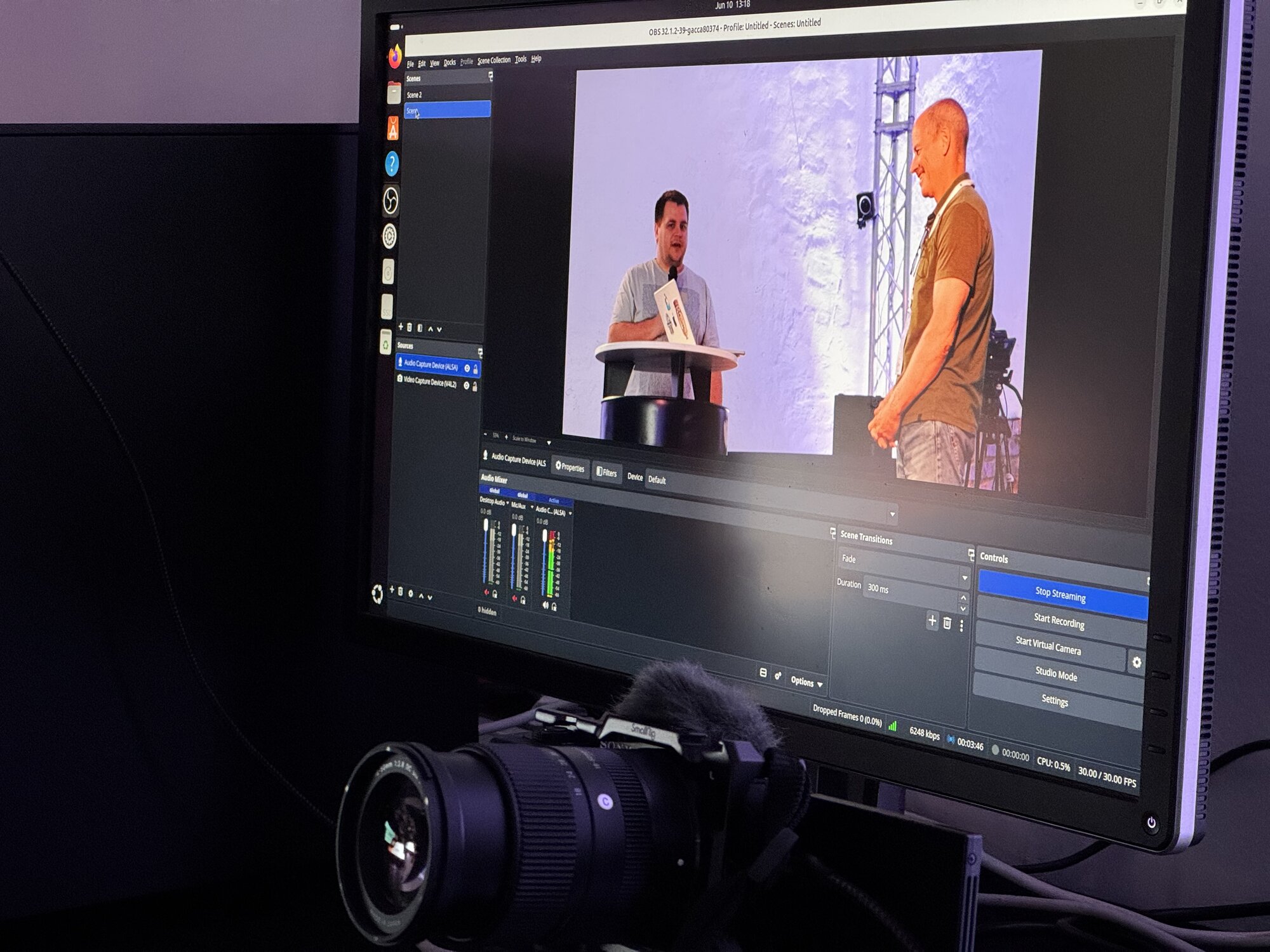
The MOQ stream setup at CommCon 2026

The first and most important decision: media packaging

Before building the player, you need to decide how your media will be packaged. This decision shapes everything downstream.

I was handed Annex B video (because that's what the moq-obs plugin produces) and raw AAC-LC audio. This meant:

  • WebCodecs (VideoDecoder, AudioDecoder) for all decoding: there's no higher-level API that handles Annex B
  • Chrome-only: MediaStreamTrackGenerator, which I needed to feed decoded frames into a <video> element, is a Chromium-only API
  • Manual A/V synchronisation from scratch
  • A significant amount of low-level media handling

A commonly used alternative is CMAF packaging. With CMAF, you can feed received segments directly into the browser's MediaSource / SourceBuffer API (MSE), which is supported everywhere, including Safari. You don't need VideoDecoder, you don't need to handle Annex B to AVCC conversion, you don't need manual A/V sync: the browser does it all for you. The player code would be substantially simpler.

 With CMAF, you give up much of the low-level control you get from raw media in favour of simplicity and browser compatibility.

The moq-obs plugin doesn't currently support CMAF output, which is why I ended up with Annex B. But if you're choosing your publisher, or building one yourself, CMAF is the packaging I'd recommend for this type of use case.

The lesson: decide your media packaging for your specific use case before you write any player code, because it determines your entire decoding pipeline, your browser support story, and how much of the work you'll need to do yourself. If you need fine-grain low-level control of your media, be prepared to accept a lot more complexity on the player side.

Building the player

Video pipeline

The first step is to initialise the VideoDecoder with a callback function that schedules the frame for playing. As we'll discuss, this is necessary for A/V sync:

decoder = new VideoDecoder({
  output: (frame) => {
    const ts = frame.timestamp;
    // calculate video QoS...
    if (!playbackStarted) {
      videoFrameQueue.push({ frame, ts });
      if (videoFirstTs === null) { videoFirstTs = ts; checkAndMaybeStart(); }
    } else {
      scheduleVideoFrame(frame, ts);
    }
  },
  error: (e) => {
    console.error('VideoDecoder error:', e);
    setError(`Decoder error: ${e.message}`);
  },
});

Each MOQ object from the publisher contains one H.264 access unit in Annex B format, preceded by a 4-byte moq_mux header that must be stripped.

The pipeline:

  1. Strip the 4-byte moq_mux header
  2. Scan for SPS/PPS NAL units in the first packet, extract an AVCDecoderConfigurationRecord using Mediabunny and configure the VideoDecoder
  3. Drop all frames until the first IDR (key frame) so the decoder starts clean
  4. Convert each access unit from Annex B to AVCC format (length-prefixed, excluding SPS/PPS)
  5. Feed the resulting EncodedVideoChunk to VideoDecoder
  6. Write decoded VideoFrame objects to a MediaStreamTrackGenerator, which feeds the <video> element
async function runVideoLoop(stream: ReadableStream<MoqtObject>) {
  let decoderConfigured = false;
  let seenKeyFrame = false;

  if (decoder && decoder.state !== 'closed') {
    try { decoder.reset(); } catch {}
  }

  const reader = stream.getReader();
  try {
    while (!stopped) {
      const { done, value } = await readOrAbortVideo(reader);
      if (done || stopped) break;
      if (!value?.payload) continue;

      const captureAgeMs = (performance.now() * 1000 - getCaptureTimestamp(value)) / 1000;
      if (captureAgeMs > LAG_THRESHOLD_MS) {
        void triggerCatchUpRestart();
        continue;
      }
      if (captureAgeMs > SKIP_THRESHOLD_MS) {
        seenKeyFrame = false; // gap in decode stream; wait for next IDR on resume
        continue;
      }

      const payload = value.payload.slice();
      const annexb = payload.slice(4);

      if (!decoderConfigured) {
        const record = extractAvcDecoderConfigurationRecord(annexb);
        if (!record) continue;
        const description = serializeAvcDecoderConfigurationRecord(record);
        decoder!.configure({ codec: decoderCodec, description, optimizeForLatency: true });
        decoderConfigured = true;
      }

      let isKey = false;
      for (const { offset } of iterateNalUnitsInAnnexB(annexb)) {
        const nalType = (annexb[offset]!) & 0x1f;
        if (nalType === AvcNalUnitType.IDR) { isKey = true; break; }
      }
      if (isKey) seenKeyFrame = true;
      if (!seenKeyFrame) continue;

      decoder!.decode(new EncodedVideoChunk({
		 type: isKey ? 'key' : 'delta',
        timestamp: getCaptureTimestamp(value),
        data: annexbToAvcc(annexb),
      }));
    }
  } finally {
    reader.releaseLock();
  }
}

One thing I had to patch: Mediabunny doesn't publicly expose the internal classes needed for Annex B handling, so I patched it to export them.

Audio pipeline

The AudioDecoder is initialised and configured similarly to the VideoDecoder, except for audio we don't need to scan the packets for a config object.

Each MOQ object contains one raw AAC-LC frame (~420 bytes). Unlike video, there is no separate init object: every object is a playable frame.

The pipeline:

  1. Strip the 4-byte moq_mux header
  2. Feed the raw bytes directly to AudioDecoder, configured upfront with the settings found in the catalog: 48 kHz stereo (0x11 0x90)
  3. Schedule decoded AudioData objects on an AudioContext using AudioBufferSourceNode.start(t)
async function runAudioLoop(stream: ReadableStream<MoqtObject>) {
  if (!audioContext || !gainNode) return;

  void audioContext.resume();
  const description = buildAacAudioSpecificConfig({
    objectType: 2,
    sampleRate: resolvedAudioSampleRate,
    numberOfChannels: resolvedAudioChannels,
  });

  let audioDecoder: AudioDecoder | null = null;
  try {
    audioDecoder = makeDecoder();
    const aReader = stream.getReader();

    try {
      while (!stopped) {
        const { done, value } = await readOrAbortAudio(aReader);
        if (done || stopped) break;
        if (!value?.payload) continue;

        if (hasCaptureTimestamp(value) &&
            (performance.now() * 1000 - getCaptureTimestamp(value)) / 1000 > LAG_THRESHOLD_MS) {
          void triggerCatchUpRestart();
          break;
        }

        if (audioDecoder.state === 'closed') {
          try { audioDecoder.close(); } catch {}
          pendingCaptureTs.length = 0; // discard timestamps for the closed decoder
          audioDecoder = makeDecoder();
        }

        const captureTs = getCaptureTimestamp(value);
        if (hasCaptureTimestamp(value) &&
            (performance.now() * 1000 - captureTs) / 1000 > SKIP_THRESHOLD_MS) continue;

        const audioData = value.payload.slice().slice(4);
        if (audioData.length === 0) continue;

        pendingCaptureTs.push(captureTs);
        audioDecoder.decode(new EncodedAudioChunk({
          type: 'key',
          timestamp: captureTs,
          data: audioData,
        }));
      }
    } finally {
      aReader.releaseLock();
    }
  } finally {
    try { audioDecoder?.close(); } catch {}
  }
}

A/V synchronisation

This was the hardest part, and the one that caused the most iteration.

Every MOQ object carries a CaptureTimestamp extension header set by the publisher's wall clock in microseconds. This is the only shared time reference between the video and audio tracks. Using it for scheduling means a video frame and an audio frame captured at the same moment will be rendered at the same moment on the subscriber side, regardless of when they arrive over the network.

Video scheduling is straightforward:

const vCaptureAgeMs = (performance.now() * 1000 - captureTimestamp_µs) / 1000;
const delayMs = Math.max(0, TARGET_LATENCY_MS - vCaptureAgeMs);

setTimeout(() => {
  if (stopped) { try { frame.close(); } catch {} return; }
  writer.write(frame).catch(() => { try { frame.close(); } catch {} });
}, delayMs);

A fresh live-edge frame gets scheduled ~100ms from now. A late frame gets written immediately. This is self-correcting: network jitter shortens the delay rather than accumulating it.

Audio scheduling uses the same target-latency formula but must work within the constraints of the Web Audio API:

// const aCaptureAgeMs = ...
const targetTime = ac.currentTime + Math.max(5, 100 - aCaptureAgeMs) / 1000;
const startAt = Math.max(targetTime, ac.currentTime + 0.005, nextScheduledAudioAt);
const frameDurationS = audioData.numberOfFrames / audioData.sampleRate;
const nextScheduledAudioAt = startAt + frameDurationS;

const buf = ac.createBuffer(
  audioData.numberOfChannels, audioData.numberOfFrames, audioData.sampleRate
);
for (let ch = 0; ch < audioData.numberOfChannels; ch++) {
  audioData.copyTo(buf.getChannelData(ch), { planeIndex: ch });
}
audioData.close();
const src = ac.createBufferSource();
src.buffer = buf;
src.connect(gn);
src.start(startAt);

The nextScheduledAudioAt floor prevents two AudioBufferSourceNodes from overlapping, which would produce a distinctive robot-voice distortion. The critical rule: this floor must never go backward. Once AudioBufferSourceNode.start(t) is called, it cannot be cancelled. Any attempt to reset the floor causes overlapping nodes.

Reinventing the wheel?

The price of low-level control

You'll hear a lot of MOQ talks mention that "you have to do things yourself." That's true, but it's worth being precise about why, because not all of the complexity is inherent to the protocol.

Some of it, like the A/V sync work above, is a direct consequence of choosing Annex B video packaging, which requires WebCodecs. With CMAF and MSE, the browser handles most of the complexity for you. I ended up doing it manually because of the publisher's output format, not because MOQ requires it.

These are things that every streaming stack does internally, and which we usually take for granted. Let’s look at two examples.

Late packets and catch-up

When a subscriber falls too far behind the live edge, the publisher eventually detects it and starts aborting old objects. From the subscriber's perspective, the audio simply stops. You need logic to detect this and recover.

My solution:

  • Objects arriving with captureAge between 300ms and 2s are skipped without decoding: the payload is discarded and the loop continues to drain the backlog without wasting CPU. For video, seenKeyFrame is reset so the decoder waits for the next IDR after the gap
  • When captureAge > 2s, a catch-up restart is triggered: unsubscribe both tracks, reset all A/V sync state, and resubscribe with FilterType.LatestObject to jump immediately to the live edge
  • A 5s cooldown guard prevents re-entry thrashing

Note that these thresholds are simple starting points, and the logic should be optimised based on the use case.

QoS loops

What became clear very early on, when starting to write the logic to handle packet delays, was that I needed to write my own QoS. Late or out-of-order packets cause audio frames to be scheduled on top of each other, which causes robot voice. Stalled tracks produce silence with no notification. You need to be able to detect this is happening in order to correct it.

I ended up writing independent QoS loops for audio and video that track delivery delays, detect stalls, and trigger resubscription when things go wrong.

This is exactly what HLS, DASH, and WebRTC stacks do internally. The difference is that those stacks ship it. With MOQ at this stage, you ship it yourself.

The following video (the recording has no audio) shows an example of the player starting with a substantial delay on the audio track. While our A/V sync logic tries to reduce the delay by each frame, the gap is just too large in this case, so after a few seconds the player triggers a resubscription. By doing so, it requests the latest object again and both tracks resume playing nicely.

While the live stream was able to correct itself in this case, this is clearly a suboptimal user experience, so more work is definitely needed here.

How it went

The stream worked. CommCon 2026 was live on MOQ.

In practice, the UX wasn't polished enough to be a finished product. A/V sync held up well most of the time, but from time to time it would drift and require a stream restart on the subscriber side to recover cleanly (and a few times, on the publisher side too). The catch-up restart logic helped but didn't eliminate the issue entirely. There were moments where the audio stalled and recovered, and moments where it didn't.

Concretely: this is a proof of concept, not a production-ready player. It proved that MOQ live-streaming a conference is achievable with today's tooling, which was the goal. But a viewer expecting broadcast-quality reliability would have been disappointed.

Lessons learned

  1. Decide your media packaging before anything else. In my case, Annex B meant WebCodecs, Chrome-only, manual A/V sync, and a lot of low-level handling. As a possible alternative, CMAF means less control, but broad browser support and a much simpler player. Whether you choose one of these two, or a different packaging format altogether, ultimately depends on your final use case and the tools you have available, but you should consider how this choice will impact the rest of your pipeline.
  2. Your tool choices are your constraints. I chose Cloudflare as the relay because I didn't want to run infrastructure. That choice cost me VOD support (no FETCH) and gave me a draft 14 ceiling that conflicted with my publisher. Choosing your relay and locking in your draft version should happen before you write any code. Know what your relay supports, and make sure your publisher matches.
  3. There is more work to do. The code in this post solves the problems I had time to solve before CommCon. There are better approaches I didn't have time to explore, CMAF being the most significant. Treat it as a starting point, not a reference implementation.
  4. Have a backup plan and know your stakes. CommCon was an in-person conference with a live stream, not a virtual conference. Even so, we were also streaming to YouTube alongside MOQ, so the event wasn’t fully relying on the MOQ stream. For a live conference, that's non-negotiable at this stage of the protocol's maturity.

What's next

Here’s what I’d consider for our future MOQ streams.

Switch to CMAF packaging. The Annex B path works, but it's the hard path. CMAF would eliminate the WebCodecs dependency, open the door to Safari support, and dramatically simplify the player: no manual A/V sync, no Annex B to AVCC conversion, no SPS/PPS scanning.

Deploy my own relay. Cloudflare's draft 14 ceiling was a constraint. Running my own relay gives me full control over the draft version and supported features, and most importantly visibility into what's happening between the publisher and the relay. Some of the audio issues I encountered may have been caused by draft mismatches that I simply couldn't diagnose. That's an uncomfortable unknown when you're debugging a live stream. Again, this doesn’t come without trade-offs: the price is you lose a global CDN and take on infrastructure to maintain.

Improve the UX. A/V sync in particular needs more work. The "restart the stream" workaround was meant to be a last resort solution, but ended up being triggered far too often, which impacted the overall user experience.


If you’re starting to set up a MOQ stream from scratch, hopefully my experience will be helpful and will help you guide your initial decisions and avoid some of the paths I went down.

Good luck, and if you stream something with MOQ, I'd love to hear how it goes.

Watch the talk

If you'd prefer to watch rather than read, the full CommCon 2026 talk is on YouTube.

Need help?

Nimble Ape has been consulting on real-time media projects for over a decade. We build products, for clients big and small all over the globe. If you’re working on these technologies and need some extra support, we’re happy to help.

Why not drop us a line on [email protected].

- Marco and the Nimble Ape team

CommConmoqOBSmoq-obsMOQtailMediabunnystreamingWebCodecsWebAudioH.264Annex BCloudflare